Learning web dev? Stop hard-coding API keys! Learn what a .env file is, why secrets management is necessary skill for your career, and how to stay secure.
Bou~codes: Make sure to grab the security checklist PDF file we prepared for you. Link at the end of the article.
If you are learning web development right now, there is one skill that separates the hobbyists from the hired pros: handling secrets.
Naima: We’re not talking about whispering office gossip. We’re talking about database passwords, API keys, and encryption tokens.
When developers first start coding, they make the classic mistake.
They hard-code API keys right into their source code and push it to GitHub.
Handling configuration data isn’t just a “nice-to-have”—it’s a mandatory requirement in any professional company.
Whether you are a self-taught developer, a bootcamp grad, or a CS student, you need to know how to keep your app secure.
Let’s break down exactly what .env files are, why they matter, and how to graduate to professional Secrets Management without getting hacked.
What Exactly is a .env File?
Let’s start with the answer you might need for a job interview or a quick explanation.
A .env file is a simple text file located at the root of your project. It stores configuration values—specifically the sensitive ones—that your application reads while it runs.
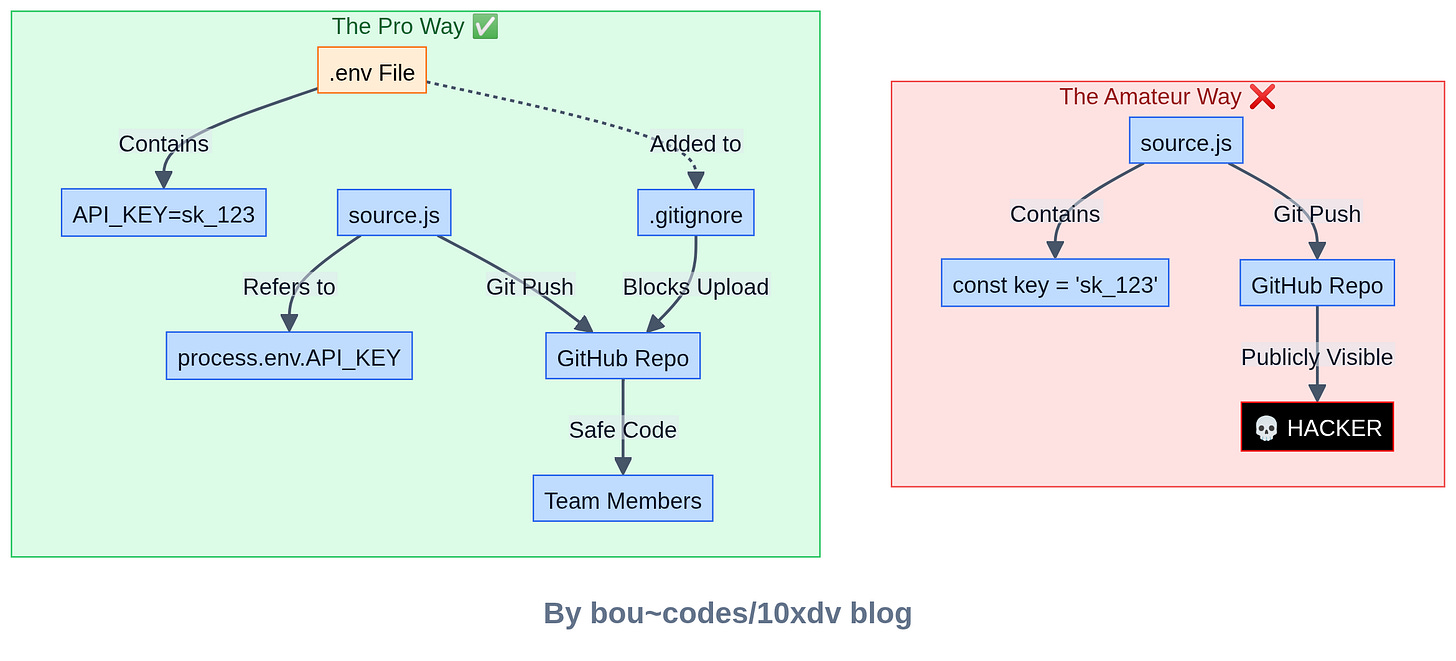
Naima: Think of it as a private note for your code. Instead of writing
const apiKey = “12345-super-secret”directly in your JavaScript or Python file, you writeprocess.env.API_KEY. Your code then looks at the.envfile to find the actual value.
Common things you’ll see in this file:
- Database Passwords:
DB_PASS=hunter2 - API Keys:
STRIPE_KEY=sk_test_4eC39HqLyjWDarjtT1zdp7dc - Server Config:
PORT=8080 - Encryption Secrets:
JWT_SECRET=my_hidden_phrase
Note for Self-Taught Devs: You might be used to tutorials that just put the API key in the code to “make it work.” That’s fine for a 10-minute tutorial, but in the real world, that’s a fireable offense. Build the habit of using environment variables now, even for small personal projects.
Some of our popular posts recently on 10xdev blog:
- Want to Become a Worse Coder? Use AI, Says Anthropic Study
- The Best Way to Learn Python in 2026? Stop Watching, Start Coding.
- 140+ Courses with Certificates.
Why You Can’t Just “Hardcode” Everything
You might wonder, “Why go through the trouble?
Why not just paste the password in the code?”
There are three massive reasons why hard-coding is a bad idea.
1. Security (Obviously)
Source code moves around.
It lives on your laptop, it gets pushed to GitHub, and it gets pulled down by other teammates.
If your secrets are in the code, everyone who sees the code sees the passwords.
2. Flexibility
Imagine you are building an app.
- On your laptop, you want to connect to a local test database.
- When you push to Production, you need to connect to the real, live customer database.
If the database URL is hard-coded, you have to change the code every time you deploy. That’s a recipe for disaster.
With environment variables, the code stays the same, but the .env file changes depending on where the code is running.
3. Team Safety
Accidents happen.
If you email a zip file of your code or share a screen, you don’t want your Stripe private key visible to the world.
The “It Works on My Machine” Problem: Handling Multiple Environments
In a professional setting, you never just have “the app.”
You have different versions of the app running in different places.
This is where the power of environment variables really shines.
Companies usually separate configurations like this:
-
Local (.env.local): This is on your machine. It uses fake data and local databases so you can break things without worry.
- Integration / Testing (.env.int): A shared server where automated tests run.
- QA (.env.qa): Where the Quality Assurance team checks for bugs before release.
- Production (.env.prod): The live app your users actually see.
Every one of these environments needs different passwords and settings.
Note for Bootcamp Grads: In bootcamp, you often rush to get the MVP (Minimum Viable Product) working. You might stick to one
.envfile. But in your first job, you’ll likely deal with complex CI/CD pipelines. Understanding that production config is different from local config will make your first week much smoother.
The Danger Zone: Deployment Risks ⚠️
Here is where things get tricky.
Just because you are using a .env file doesn’t mean you are 100% safe.
Beginners often trip up during deployment.
The Docker Trap
A very common mistake is baking environment variables into a Docker image or putting them inside a docker-compose.yml file.
If you write:
environment:
  - DB_PASSWORD=secret123
…inside your docker-compose.yml and push that file to GitHub, you have just leaked your secret.
Even worse, if you include the .env file in your Docker build process, the secrets become part of the image history.
Anyone who pulls that image can inspect the layers and find your keys.
Is the .env file itself dangerous?
No. The file is safe if it stays on your server. But if it leaks, it gives attackers the keys to the castle.
If a hacker gets your .env file, they can:
- Steal or delete your user data.
- Use your paid APIs (and run up your bill).
- Send fake emails from your domain.
- Create fake admin accounts to lock you out.
This leads us to the most important rule of this entire article.
🛑 The Golden Rule: Never Commit .env to Git
You must add .env to your .gitignore file immediately.
If you commit it, it lives in the git history forever, even if you delete it later.
Note for CS Students: You learned about Git in class, but they might not have stressed git hygiene. Before you
git add ., always rungit statusand check if that sneaky.envfile is being staged. If it is, stop and update your.gitignore.
The Professional Upgrade: Secrets Management
Okay, so .env files are great for local development.
But what happens when you have 50 microservices and 20 developers?
Emailing .env files back and forth is insecure and messy.
This is where Secrets Managers come in.
Professional companies don’t usually store secrets in text files on the production server.
They use dedicated tools to inject secrets safely.
Why use a Manager?
- Centralization: You change the password in one place, and all apps get the update.
- Rotation: You can set it to automatically change passwords every 30 days (Auto-Rotation).
- Access Control: You can control exactly which developer sees which key. Maybe the junior dev shouldn’t see the production database password.
Popular Tools You Should Know
If you want to impress a hiring manager, mention that you’ve experimented with one of these:
- Cloud Providers: AWS Secrets Manager, Azure Key Vault, Google Secret Manager.
- Dev-First Tools: Doppler (very popular right now), Infisical, HashiCorp Vault.
These tools allow your app to fetch the secrets it needs while it starts up, without ever writing them to a file on the disk.
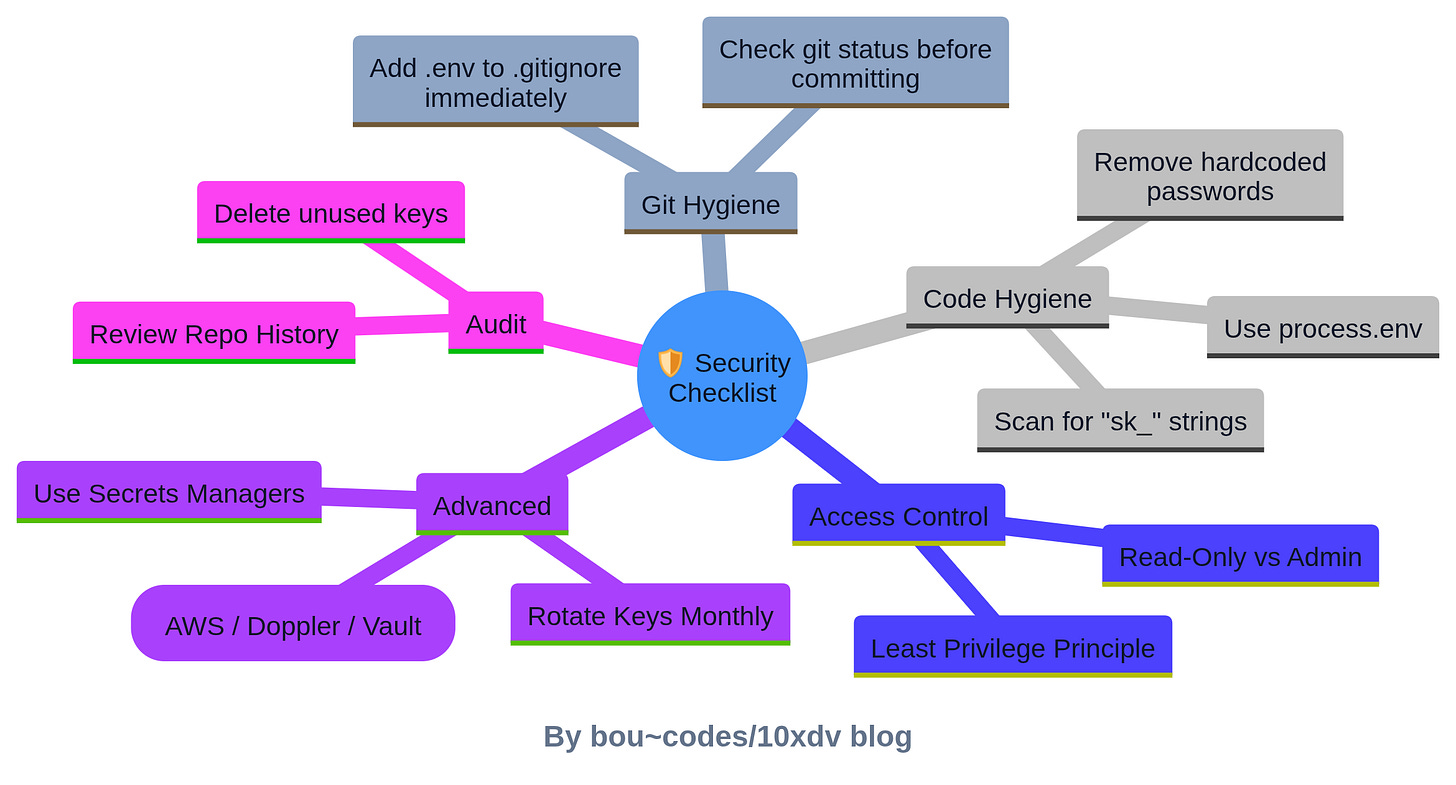
Your Security Checklist
Ready to secure your code? Here is your action plan.
- Git Ignore: Go to your project right now and ensure
.envis in your.gitignore. - No Hardcoding: Scan your code. Do you see any strings starting with
sk_orpassword? Move them to variables. - Least Privilege: Does your app really need “Admin” access to the database? Or just “Read/Write”? Give it only what it needs.
- Try a Secrets Manager: Sign up for a free tier of Doppler or AWS Secrets Manager and try to connect it to a “Hello World” app.
- Audit: Every few months, check your unused keys and delete them.
The Bottom Line
Handling secrets correctly is not just about avoiding a hack.
It is about showing that you are a responsible engineer who cares about the product and the company.
.env files are your first step. They keep your config clean and your secrets out of your source code.
But as you grow, look into professional Secrets Management tools.
My advice? Start today. Go through your GitHub repositories.
If you find any hard-coded keys in your old projects, revoke them immediately and rewrite the code to use environment variables. It’s the best practice you can get for the real world. Want to practice this? Try setting up a simple Node.js or Python app today that connects to a database using only environment variables. It’s a small project that teaches a massive lesson.
Download The Developer Security Checklist and check our complete library.