RxJS’ of() is a creational operator that allows you to create an RxJS Observable from a sequence of values.
According to the official docs:
of()converts the arguments to an observable sequence.
For example:
import { of } from 'rxjs';

of(1, 2, 3, 4)
.subscribe(
  next => console.log('next:', next),
  err => console.log('error:', err),
  () => console.log('Completed'),
);
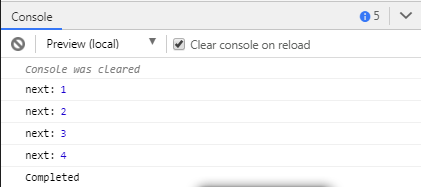
This is a screenshot of the output:
In Angular, you can use the of() operator to implement many use cases. For example, you can use it to mock data in your service for HttpClient.
Create an Angular 8 project, navigate to it and run the following command to generate a service:
$ ng generate service data
Next, open the src/app/data.service.ts file and start by importing the of() operator from rxjs:
import { Injectable } from '@angular/core';
import { of } from 'rxjs';


@Injectable({
  providedIn: 'root'
})
export class DataService {
}
Next, add a new products property to the service which contains the data we want to serve as our mocked response and a get() method that returns products as an RxJS Observable using the of() operator:
@Injectable({
  providedIn: 'root'
})
export class DataService {
  products: Array<object> = [
    { name: 'Product 001'},
    { name: 'Product 002'},
    { name: 'Product 003'},
    { name: 'Product 004'},
    { name: 'Product 005'}
  ];
  get() {
    return of(this.products);
  }
}
Next, let’s subscribe to this observable in our component. Open the src/app/app.component.ts file, import the data service and susbscribe to the get() method as follows:
import { Component, OnInit } from '@angular/core';
import { DataService } from './data.service';

@Component({
  selector: 'app-root',
  template: `<ul>
	  <li *ngFor="let product of products">
	    {{product.name}}
	  </li>
  </ul>`,
  styleUrls: ['./app.component.css']
})
export class AppComponent implements OnInit{
  title = 'Angular RxJS Examples';

  products: Array<object>;

  constructor(private dataService: DataService) { }

  ngOnInit() {
    this.dataService.get().subscribe(res => {
      this.products = res;
      console.log(res);
    });
  }
}
That’s you should see your products displyed in an HTML list.
It’s always a good habit to unsubscribe from your RxJS observables after you leave your components.
Conclusion
In this quick example, we have learned about the of() operator in RxJS and seen a real-world use case of it in the context of an Angular 8 app.